
Underwrite a merchant
Pull a full merchant profile, review website, reviews, industry and licenses, and open an account for approved merchants.
One Merchant Profiler request returns the registration, website, reviews, industry, licenses and personnel data you need to approve a merchant.
- Step 1ProfilePOST /
merchant_profiler/ - Step 2PollGET ?
request_id= - Step 3Review sections
- Step 4Save a reportGET /
establishment/ {establishment_id}/ merchant_ profiler_ pdf_ report/ - Step 5Create the accountPOST /
accounts/ - Step 6Add personsPOST /
accounts/ {account_id}/ persons/
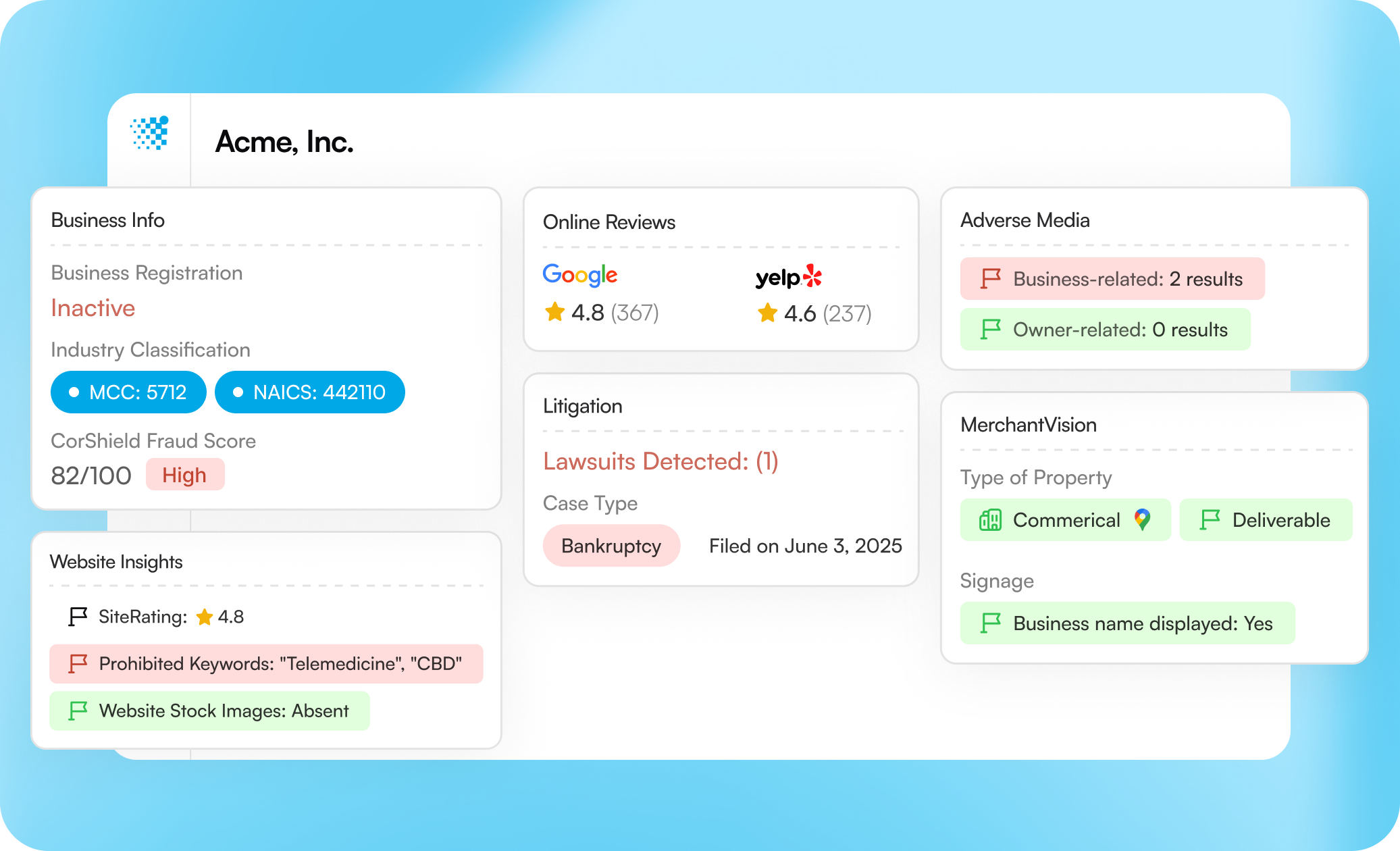
Product view from coris.ai, simplified for illustration. It shows (1) registration, industry codes and the CorShield score, (2) reviews and litigation, and (3) adverse media and the location check.
Step 1: Set up your key
Set your key and base URL once.
export CORIS_BASE_URL="https://sandbox-api.coris.ai/api/v0_2"
export CORIS_API_KEY="YOUR_API_KEY"
import requests
BASE_URL = "https://sandbox-api.coris.ai/api/v0_2"
HEADERS = {"Authorization": "Token YOUR_API_KEY"}const BASE_URL = "https://sandbox-api.coris.ai/api/v0_2";
const HEADERS = {
Authorization: "Token YOUR_API_KEY",
"Content-Type": "application/json",
};The samples below wait with the polling helper. Expand it, and run it too.
Polling helper
# Polls an async endpoint and prints the body once it returns 200.
# 206, 425, 429 and 500 all mean wait and poll again. A 500 re-queues the job.
poll() {
  delay=5
  for _ in $(seq 1 30); do
    http_status=$(curl -s -o /tmp/coris_body -w '%{http_code}' \
      -H "Authorization: Token $CORIS_API_KEY" \
      "$CORIS_BASE_URL$1?request_id=$2")
    if [ "$http_status" = "200" ]; then cat /tmp/coris_body; return 0; fi
    case "$http_status" in
      206|425|429|500) ;;
      *) echo "HTTP $http_status: $(cat /tmp/coris_body)" >&2; return 1 ;;
    esac
    sleep "$delay"
    delay=$((delay * 3 / 2)); [ "$delay" -gt 30 ] && delay=30
  done
  echo "Timed out" >&2; return 1
}
import time
# 206, 425, 429 and 500 all mean wait and poll again. A 500 re-queues the job.
RETRYABLE = (206, 425, 429, 500)
def poll(path, request_id, attempts=30):
"""Polls an async endpoint and returns the JSON body once it returns 200."""
delay = 5
for _ in range(attempts):
response = requests.get(
f"{BASE_URL}{path}", params={"request_id": request_id}, headers=HEADERS
)
if response.status_code == 200:
return response.json()
if response.status_code not in RETRYABLE:
response.raise_for_status()
time.sleep(delay)
delay = min(delay * 1.5, 30)
raise TimeoutError(f"{path} did not finish")// 206, 425, 429 and 500 all mean wait and poll again. A 500 re-queues the job.
const RETRYABLE = [206, 425, 429, 500];
// Polls an async endpoint and returns the JSON body once it returns 200.
async function poll(path, requestId, attempts = 30) {
let delay = 5000;
for (let i = 0; i < attempts; i++) {
const url = `${BASE_URL}${path}?request_id=${requestId}`;
const response = await fetch(url, { headers: HEADERS });
if (response.status === 200) return response.json();
if (!RETRYABLE.includes(response.status)) {
throw new Error(`HTTP ${response.status}: ${await response.text()}`);
}
await new Promise((resolve) => setTimeout(resolve, delay));
delay = Math.min(delay * 1.5, 30000);
}
throw new Error(`${path} did not finish`);
}Step 2: Request the profile
With no data_types, Coris runs your workspace's default sections.
REQUEST_ID=$(curl -s -X POST "$CORIS_BASE_URL/merchant_profiler/" \
  -H "Authorization: Token $CORIS_API_KEY" \
  -H "Content-Type: application/json" \
  -d '{
    "business_name": "Acme Plumbing Co.",
    "address": {
      "address_type": "Registration",
      "city": "San Jose",
      "state": "CA",
      "country": "US"
    },
    "phone_number": "408-555-0142",
    "website": "https://www.acmeplumbing.example"
  }' | jq -r '.request_id')

echo "$REQUEST_ID"
response = requests.post(
f"{BASE_URL}/merchant_profiler/",
headers=HEADERS,
json={
"business_name": "Acme Plumbing Co.",
"address": {
"address_type": "Registration",
"city": "San Jose",
"state": "CA",
"country": "US",
},
"phone_number": "408-555-0142",
"website": "https://www.acmeplumbing.example",
},
)
response.raise_for_status()
request_id = response.json()["request_id"]
print(request_id)const created = await fetch(`${BASE_URL}/merchant_profiler/`, {
method: "POST",
headers: HEADERS,
body: JSON.stringify({
business_name: "Acme Plumbing Co.",
address: {
address_type: "Registration",
city: "San Jose",
state: "CA",
country: "US",
},
phone_number: "408-555-0142",
website: "https://www.acmeplumbing.example",
}),
});
if (!created.ok) throw new Error(await created.text());
const { request_id: requestId } = await created.json();
console.log(requestId);Try POST /merchant_profiler/ in the API explorer.
Step 3: Read the profile
Poll until the profile is ready, and keep establishment.id for the next steps.
PROFILE=$(poll /merchant_profiler/ "$REQUEST_ID")
ESTABLISHMENT_ID=$(printf '%s' "$PROFILE" | jq -r '.establishment.id')
printf '%s' "$PROFILE" | jq '{establishment, legal_entity, portal_link}'
profile = poll("/merchant_profiler/", request_id)
establishment_id = profile["establishment"]["id"]
print(profile["establishment"], profile["legal_entity"], profile.get("portal_link"))const profile = await poll("/merchant_profiler/", requestId);
const establishmentId = profile.establishment.id;
console.log(profile.establishment, profile.legal_entity, profile.portal_link);Step 4: Save a PDF report
Fetch one report for your underwriting file. pdf_report_url can be null with is_complete set to false.
curl -s "$CORIS_BASE_URL/establishment/$ESTABLISHMENT_ID/merchant_profiler_pdf_report/" \
  -H "Authorization: Token $CORIS_API_KEY" | jq
response = requests.get(
f"{BASE_URL}/establishment/{establishment_id}/merchant_profiler_pdf_report/",
headers=HEADERS,
)
response.raise_for_status()
print(response.json())const report = await fetch(
`${BASE_URL}/establishment/${establishmentId}/merchant_profiler_pdf_report/`,
{ headers: HEADERS },
);
console.log(await report.json());Try GET /establishment/{establishment_id}/merchant_profiler_pdf_report/ in the API explorer.
Step 5: Create the account
Open the account for a merchant you approve, using establishment.id from step 3.
REFERENCE_ID="acme-plumbing-$(date +%s)"

ACCOUNT=$(curl -s -X POST "$CORIS_BASE_URL/accounts/" \
  -H "Authorization: Token $CORIS_API_KEY" \
  -H "Content-Type: application/json" \
  -d "{\"reference_id\": \"$REFERENCE_ID\", \"establishment_id\": \"$ESTABLISHMENT_ID\"}")

ACCOUNT_ID=$(printf '%s' "$ACCOUNT" | jq -r '.id')
echo "$ACCOUNT_ID"
reference_id = f"acme-plumbing-{int(time.time())}"
response = requests.post(
f"{BASE_URL}/accounts/",
headers=HEADERS,
json={"reference_id": reference_id, "establishment_id": establishment_id},
)
response.raise_for_status()
account_id = response.json()["id"]
print(account_id)const referenceId = `acme-plumbing-${Date.now()}`;
const createdAccount = await fetch(`${BASE_URL}/accounts/`, {
method: "POST",
headers: HEADERS,
body: JSON.stringify({ reference_id: referenceId, establishment_id: establishmentId }),
});
if (!createdAccount.ok) throw new Error(await createdAccount.text());
const account = await createdAccount.json();
const accountId = account.id;
console.log(accountId);Try POST /accounts/ in the API explorer.
Read the response
Each section of the profile from step 3 tells you what to check before you approve.
| Section | What to do |
|---|---|
legal_entity_registrations | Check status and filing date. |
legal_entity_licenses | Check them against the trade. |
personnel | Compare them with the application. |
establishment_website | Check policies and contact details. |
establishment_reviews | Read any low rating or bad review. |
establishment_ratings | Review a biz_rating or website_rating of 4 or 5. 1 is best. See How to read Coris scores. |
establishment_industry | Compare it with the declared MCC. |
establishment_adverse_media | Review any entry. |
establishment_litigation_checker | Review any entry. |
A section that failed holds an error key instead of data.
Workspaces on the original API version receive establishment_rating instead of establishment_ratings.
What to do next
Decide each merchant with the example policy, one table that covers these sections and the risk score.
FAQ
How do I add a risk score?
Add business_fraud_check to data_types in step 2, and set first_party to false unless Coris has enabled that model for you. The score arrives under corshield. List every section you need, because data_types replaces your default sections.
To score separately, see Verify a business at onboarding.
Can Coris create the account for me?
Yes. Send reference_id with create_account set to true in step 2.
How do I add the merchant's owners?
Add each one after step 5 with Add a person to an account.
Next: Monitor your portfolio
Updated about 23 hours ago