
Monitor your portfolio
Start merchant monitoring on accounts, receive alert webhooks, label accounts with tags and stop monitoring when a merchant leaves.
New accounts are monitored by default, and Coris sends alerts to your webhook and the portal.
- You → Coris1POST
/ webhooks/ - You → Coris2POST
/ accounts/ - Monitoring finds a change
- Coris → You3Webhookalert.created
- You → Coris4POST
/ accounts/ {account_id}/ account_tags/ - You → Coris5POST
/ accounts/ {account_id}/ stop_monitoring/ - You → Coris6POST
/ accounts/ {account_id}/ monitor/
For reviewers
Reviewers work merchant alerts on the Merchant Alerts page in the portal. If you have no portal login, request one.
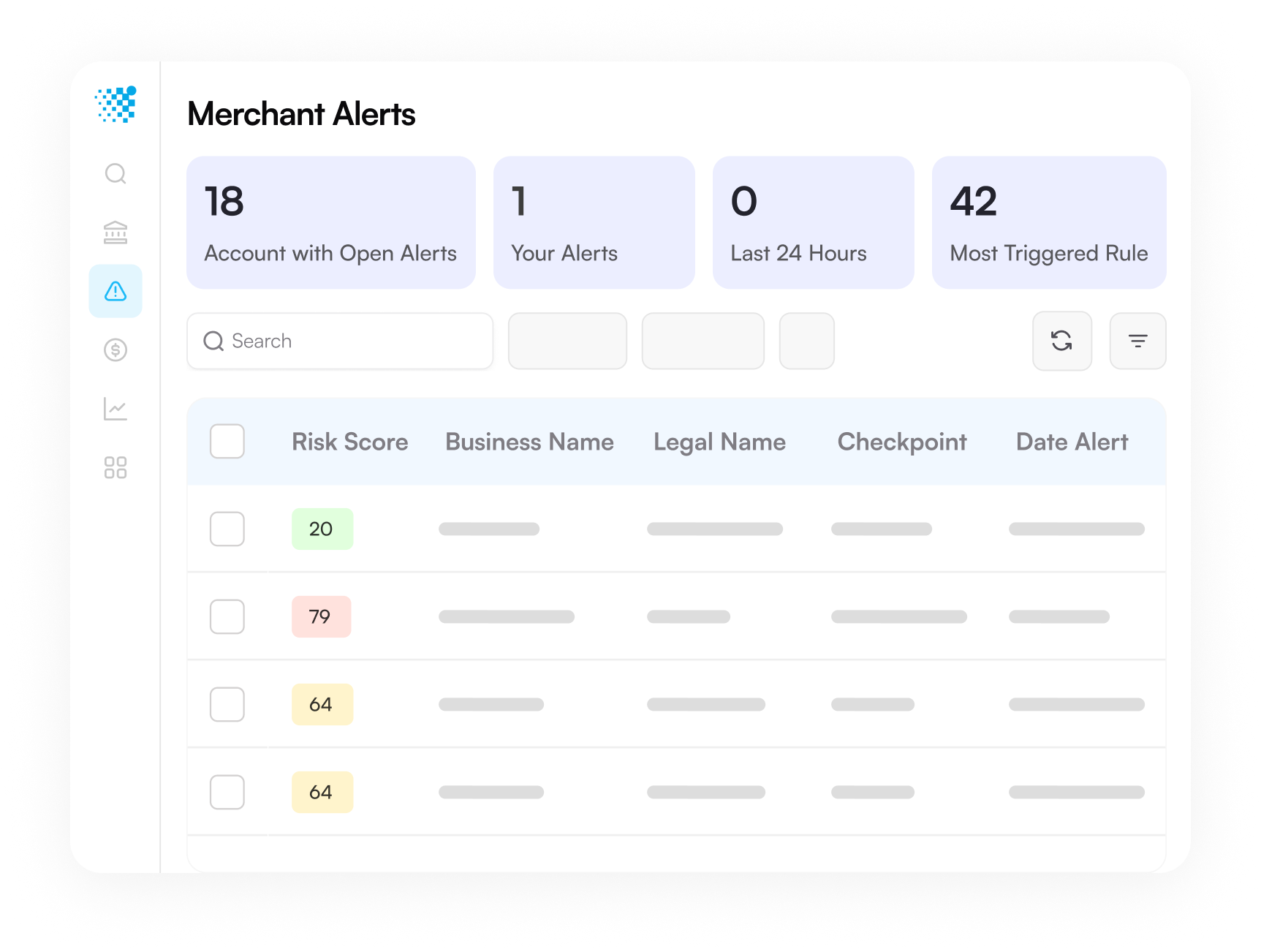
Product view from coris.ai, simplified for illustration. It shows (1) counts of open alerts, (2) search and filters, and (3) the alert list.
| Field | What it means |
|---|---|
| Risk score | The merchant's Coris risk score. A higher score means more risk. |
| Checkpoint | What started the check, such as onboarding, scheduled monitoring or an account update. |
| Rules | Each rule that fired, with its description, priority and the time it fired. |
| Queue and assignee | The queue that holds the alert, and the person or team that owns it. |
| Status | Where the alert stands, from open to closed. See Monitoring and alerts explained. |
To record an outcome:
- Open the alert, and read the rules that fired and the account details.
- Add a note with what you found and what you checked.
- Pick a queue action. The action closes the alert as valid for a real risk, or invalid for a false alarm, or moves it on.
For developers
Route alerts to your systems, label reviewed accounts, and stop or restart monitoring by API.
Step 1: Set up your key and a test account
Set your key and base URL once.
export CORIS_BASE_URL="https://sandbox-api.coris.ai/api/v0_2"
export CORIS_API_KEY="YOUR_API_KEY"
import requests
BASE_URL = "https://sandbox-api.coris.ai/api/v0_2"
HEADERS = {"Authorization": "Token YOUR_API_KEY"}const BASE_URL = "https://sandbox-api.coris.ai/api/v0_2";
const HEADERS = {
Authorization: "Token YOUR_API_KEY",
"Content-Type": "application/json",
};The samples below wait with the polling helper. Expand it, and run it too.
Polling helper
# Polls an async endpoint and prints the body once it returns 200.
# 206, 425, 429 and 500 all mean wait and poll again. A 500 re-queues the job.
poll() {
  delay=5
  for _ in $(seq 1 30); do
    http_status=$(curl -s -o /tmp/coris_body -w '%{http_code}' \
      -H "Authorization: Token $CORIS_API_KEY" \
      "$CORIS_BASE_URL$1?request_id=$2")
    if [ "$http_status" = "200" ]; then cat /tmp/coris_body; return 0; fi
    case "$http_status" in
      206|425|429|500) ;;
      *) echo "HTTP $http_status: $(cat /tmp/coris_body)" >&2; return 1 ;;
    esac
    sleep "$delay"
    delay=$((delay * 3 / 2)); [ "$delay" -gt 30 ] && delay=30
  done
  echo "Timed out" >&2; return 1
}
import time
# 206, 425, 429 and 500 all mean wait and poll again. A 500 re-queues the job.
RETRYABLE = (206, 425, 429, 500)
def poll(path, request_id, attempts=30):
"""Polls an async endpoint and returns the JSON body once it returns 200."""
delay = 5
for _ in range(attempts):
response = requests.get(
f"{BASE_URL}{path}", params={"request_id": request_id}, headers=HEADERS
)
if response.status_code == 200:
return response.json()
if response.status_code not in RETRYABLE:
response.raise_for_status()
time.sleep(delay)
delay = min(delay * 1.5, 30)
raise TimeoutError(f"{path} did not finish")// 206, 425, 429 and 500 all mean wait and poll again. A 500 re-queues the job.
const RETRYABLE = [206, 425, 429, 500];
// Polls an async endpoint and returns the JSON body once it returns 200.
async function poll(path, requestId, attempts = 30) {
let delay = 5000;
for (let i = 0; i < attempts; i++) {
const url = `${BASE_URL}${path}?request_id=${requestId}`;
const response = await fetch(url, { headers: HEADERS });
if (response.status === 200) return response.json();
if (!RETRYABLE.includes(response.status)) {
throw new Error(`HTTP ${response.status}: ${await response.text()}`);
}
await new Promise((resolve) => setTimeout(resolve, delay));
delay = Math.min(delay * 1.5, 30000);
}
throw new Error(`${path} did not finish`);
}This call creates a test account for the steps below.
REFERENCE_ID="acme-plumbing-$(date +%s)"

REQUEST_ID=$(curl -s -X POST "$CORIS_BASE_URL/accounts/" \
  -H "Authorization: Token $CORIS_API_KEY" \
  -H "Content-Type: application/json" \
  -d "{
    \"reference_id\": \"$REFERENCE_ID\",
    \"business_name\": \"Acme Plumbing Co.\",
    \"address\": { \"address_type\": \"Registration\", \"city\": \"San Jose\", \"state\": \"CA\", \"country\": \"US\" }
  }" | jq -r '.request_id')

ACCOUNT_ID=$(poll /accounts/ "$REQUEST_ID" | jq -r '.id')
reference_id = f"acme-plumbing-{int(time.time())}"
response = requests.post(
f"{BASE_URL}/accounts/",
headers=HEADERS,
json={
"reference_id": reference_id,
"business_name": "Acme Plumbing Co.",
"address": {
"address_type": "Registration",
"city": "San Jose",
"state": "CA",
"country": "US",
},
},
)
response.raise_for_status()
account_id = poll("/accounts/", response.json()["request_id"])["id"]const referenceId = `acme-plumbing-${Date.now()}`;
const accountJob = await fetch(`${BASE_URL}/accounts/`, {
method: "POST",
headers: HEADERS,
body: JSON.stringify({
reference_id: referenceId,
business_name: "Acme Plumbing Co.",
address: { address_type: "Registration", city: "San Jose", state: "CA", country: "US" },
}),
});
if (!accountJob.ok) throw new Error(await accountJob.text());
const accountRequestId = (await accountJob.json()).request_id;
const accountId = (await poll("/accounts/", accountRequestId)).id;Step 2: Subscribe to alerts
Use webhooks instead of polling the account list.
WEBHOOK_URL="https://hooks.acmeplatform.example/coris/alerts"
SUBSCRIBED='["alert.created", "alert.updated"]'

# Reuse the endpoint if this URL is already registered. A second POST returns 500.
WEBHOOK=$(curl -s "$CORIS_BASE_URL/webhooks/?disabled=true&limit=100" \
  -H "Authorization: Token $CORIS_API_KEY" \
  | jq -c --arg url "$WEBHOOK_URL" '.[] | select(.url == $url)')

if [ -z "$WEBHOOK" ]; then
  WEBHOOK=$(curl -s -X POST "$CORIS_BASE_URL/webhooks/" \
    -H "Authorization: Token $CORIS_API_KEY" \
    -H "Content-Type: application/json" \
    -d "{
      \"name\": \"Risk events\",
      \"description\": \"Sends risk events to the review service\",
      \"url\": \"$WEBHOOK_URL\",
      \"subscribed_events\": $SUBSCRIBED
    }")
fi

WEBHOOK_ID=$(printf '%s' "$WEBHOOK" | jq -r '.id')
SIGNING_SECRET=$(printf '%s' "$WEBHOOK" | jq -r '.signing_secret')

# A reused endpoint may be disabled, or subscribed to other events.
if [ "$(printf '%s' "$WEBHOOK" | jq '.enabled')" = "false" ]; then
  curl -s -X POST "$CORIS_BASE_URL/webhooks/$WEBHOOK_ID/enable/" \
    -H "Authorization: Token $CORIS_API_KEY" > /dev/null
fi

if [ "$(printf '%s' "$WEBHOOK" | jq --argjson want "$SUBSCRIBED" '(.subscribed_events | sort) == ($want | sort)')" = "false" ]; then
  printf '%s' "$WEBHOOK" | jq --argjson want "$SUBSCRIBED" '{name, description, subscribed_events: $want}' \
    | curl -s -X POST "$CORIS_BASE_URL/webhooks/$WEBHOOK_ID/" \
      -H "Authorization: Token $CORIS_API_KEY" \
      -H "Content-Type: application/json" \
      -d @- > /dev/null
fi
webhook_url = "https://hooks.acmeplatform.example/coris/alerts"
subscribed = ["alert.created", "alert.updated"]
# Reuse the endpoint if this URL is already registered. A second POST returns 500.
existing = requests.get(
f"{BASE_URL}/webhooks/", params={"disabled": "true", "limit": 100}, headers=HEADERS
).json()
webhook = next((item for item in existing if item["url"] == webhook_url), None)
if webhook is None:
response = requests.post(
f"{BASE_URL}/webhooks/",
headers=HEADERS,
json={
"name": "Risk events",
"description": "Sends risk events to the review service",
"url": webhook_url,
"subscribed_events": subscribed,
},
)
response.raise_for_status()
webhook = response.json()
webhook_id = webhook["id"]
signing_secret = webhook["signing_secret"]
# A reused endpoint may be disabled, or subscribed to other events.
if not webhook["enabled"]:
requests.post(f"{BASE_URL}/webhooks/{webhook_id}/enable/", headers=HEADERS).raise_for_status()
if sorted(webhook["subscribed_events"]) != sorted(subscribed):
requests.post(
f"{BASE_URL}/webhooks/{webhook_id}/",
headers=HEADERS,
json={
"name": webhook["name"],
"description": webhook["description"],
"subscribed_events": subscribed,
},
).raise_for_status()const webhookUrl = "https://hooks.acmeplatform.example/coris/alerts";
const subscribed = ["alert.created", "alert.updated"];
// Reuse the endpoint if this URL is already registered. A second POST returns 500.
const listed = await fetch(`${BASE_URL}/webhooks/?disabled=true&limit=100`, { headers: HEADERS });
let webhook = (await listed.json()).find((item) => item.url === webhookUrl);
if (!webhook) {
const createdWebhook = await fetch(`${BASE_URL}/webhooks/`, {
method: "POST",
headers: HEADERS,
body: JSON.stringify({
name: "Risk events",
description: "Sends risk events to the review service",
url: webhookUrl,
subscribed_events: subscribed,
}),
});
if (!createdWebhook.ok) throw new Error(await createdWebhook.text());
webhook = await createdWebhook.json();
}
const webhookId = webhook.id;
const signingSecret = webhook.signing_secret;
// A reused endpoint may be disabled, or subscribed to other events.
if (!webhook.enabled) {
const enabled = await fetch(`${BASE_URL}/webhooks/${webhookId}/enable/`, {
method: "POST",
headers: { Authorization: HEADERS.Authorization },
});
if (!enabled.ok) throw new Error(await enabled.text());
}
const sameEvents = [...webhook.subscribed_events].sort().join() === [...subscribed].sort().join();
if (!sameEvents) {
const updated = await fetch(`${BASE_URL}/webhooks/${webhookId}/`, {
method: "POST",
headers: HEADERS,
body: JSON.stringify({
name: webhook.name,
description: webhook.description,
subscribed_events: subscribed,
}),
});
if (!updated.ok) throw new Error(await updated.text());
}Try POST /webhooks/ in the API explorer.
Step 3 (optional): Label reviewed accounts
Tag an account when an alert closes, so that your systems and the portal agree.
Send mode and a new name, because a missing mode or a repeated name returns 500. This sample adds a timestamp.
http_status=$(curl -s -o /tmp/coris_body -w '%{http_code}' -X POST "$CORIS_BASE_URL/account_tags/" \
  -H "Authorization: Token $CORIS_API_KEY" \
  -H "Content-Type: application/json" \
  -d "{ \"name\": \"risk_tier_$(date +%s)\", \"description\": \"Your risk tier\", \"type\": \"String\", \"mode\": \"ReadWrite\" }")

case "$http_status" in
  2*)
    TAG_ID=$(jq -r '.id' /tmp/coris_body)
    curl -s -X POST "$CORIS_BASE_URL/accounts/$ACCOUNT_ID/account_tags/" \
      -H "Authorization: Token $CORIS_API_KEY" \
      -H "Content-Type: application/json" \
      -d "{ \"account_tag_id\": \"$TAG_ID\", \"account_tag_value\": \"standard\" }"
    ;;
  *) echo "HTTP $http_status: $(cat /tmp/coris_body)" >&2 ;;
esac
tag_response = requests.post(
f"{BASE_URL}/account_tags/",
headers=HEADERS,
json={
"name": f"risk_tier_{int(time.time())}",
"description": "Your risk tier",
"type": "String",
"mode": "ReadWrite",
},
)
if not tag_response.ok:
raise RuntimeError(f"HTTP {tag_response.status_code}: {tag_response.text}")
response = requests.post(
f"{BASE_URL}/accounts/{account_id}/account_tags/",
headers=HEADERS,
json={"account_tag_id": tag_response.json()["id"], "account_tag_value": "standard"},
)
print(response.status_code, response.text)const tagResponse = await fetch(`${BASE_URL}/account_tags/`, {
method: "POST",
headers: HEADERS,
body: JSON.stringify({
name: `risk_tier_${Date.now()}`,
description: "Your risk tier",
type: "String",
mode: "ReadWrite",
}),
});
if (!tagResponse.ok) throw new Error(`HTTP ${tagResponse.status}: ${await tagResponse.text()}`);
const tag = await tagResponse.json();
const tagged = await fetch(`${BASE_URL}/accounts/${accountId}/account_tags/`, {
method: "POST",
headers: HEADERS,
body: JSON.stringify({ account_tag_id: tag.id, account_tag_value: "standard" }),
});
console.log(tagged.status, await tagged.text());Try POST /account_tags/ in the API explorer.
Step 4: Stop monitoring
Stop monitoring an account when the merchant leaves. With no body, any run you started stays as it is. To stop that run too, send its checkpoint.
curl -s -X POST "$CORIS_BASE_URL/accounts/$ACCOUNT_ID/stop_monitoring/" \
  -H "Authorization: Token $CORIS_API_KEY"
response = requests.post(f"{BASE_URL}/accounts/{account_id}/stop_monitoring/", headers=HEADERS)
print(response.status_code, response.text)const stop = await fetch(`${BASE_URL}/accounts/${accountId}/stop_monitoring/`, {
method: "POST",
headers: { Authorization: HEADERS.Authorization },
});
console.log(stop.status, await stop.text());Try POST /accounts/{account_id}/stop_monitoring/ in the API explorer.
Step 5: Restart monitoring
Restart monitoring on an account you stopped earlier. Send no body.
curl -s -X POST "$CORIS_BASE_URL/accounts/$ACCOUNT_ID/monitor/" \
  -H "Authorization: Token $CORIS_API_KEY"
response = requests.post(f"{BASE_URL}/accounts/{account_id}/monitor/", headers=HEADERS)
print(response.status_code, response.text)const restart = await fetch(`${BASE_URL}/accounts/${accountId}/monitor/`, {
method: "POST",
headers: { Authorization: HEADERS.Authorization },
});
console.log(restart.status, await restart.text());Try POST /accounts/{account_id}/monitor/ in the API explorer.
Read the response
Your webhook receives an event like this when an alert opens.
{
  "id": "8f2d7e3a-1b45-47c1-b4a8-2bd0a9e1f001",
  "type": "alert.created",
  "timestamp": 1762300800,
  "data": {
    "account": {
      "reference_id": "acme-plumbing-001"
    }
  }
}| Field | Meaning | What to do |
|---|---|---|
id | The ID of this event. | Use it to skip duplicate deliveries. |
data.account.reference_id | Your merchant ID. | Find the merchant in your system. |
What to do next
Act on the outcome your reviewer records in the portal.
| Outcome | Action |
|---|---|
| The alert shows a real risk | Apply your policy, such as a limit change. |
| The alert is a false alarm | No action. |
| You need more from the merchant | Contact the merchant. |
To read or update alerts by API, you need the partner reference. Ask for access.
FAQ
How often does Coris check an account?
Onboarding checks run once, when you create the account. Event checks run when new data arrives, and scheduled checks run daily, weekly, every two weeks or monthly. For timing, see Monitoring and alerts explained.
Do I keep receiving alerts after I stop monitoring?
Not from new monitoring runs, unless your setup has a check that also runs on stopped accounts. Open alerts stay in the portal.
Can I trigger a test alert in the sandbox?
The public API has no test trigger for alerts. To test your endpoint and signature check, add account.tag.created to subscribed_events in step 2, run it again, then apply a tag in step 3.
Updated about 23 hours ago